Loyalty cards
Centered icon, short feature heading, and direct supporting copy.

Visual source of truth for the existing TapTapp brand, tokens, reusable components, and responsive UI patterns.
Reference map
Foundation
TapTapp uses a deep-blue canvas, white content surfaces, and a focused cyan accent. Use semantic ploy tokens before reaching for a numbered color scale.
Global deep-blue canvas
ploy-neutral-primary
White content surface
ploy-neutral-secondary
Primary CTA and interactive cyan
ploy-accent-primary
Subtle decoration and highlights
ploy-accent-primary-200
Deep supporting accent
ploy-accent-tertiary
Light section background
ploy-background-inverse
Page surface
Start with bg-ploy-background-primary.
Content surface
Use bg-ploy-background-inverse or the shared Card.
Primary action
Reserve ploy-accent-primary for CTAs and highlights.
Foundation
Museo defines TapTapp headings. Museo300 handles body copy and navigation, while Museo500 supports short labels and eyebrows.
font-heading · Museo 700Sve kartice na telefonu
font-body · Museo300Clear supporting copy explains the feature, the action, and the benefit without adding decorative language.
font-eyebrow · Museo500Feature-first label
font-button · Museo300 600Responsive scale
| Role | Mobile | Tablet | Desktop |
|---|---|---|---|
| Hero heading | text-4xl | md:text-6xl | lg:text-7xl |
| Section heading | text-3xl | md:text-4xl | lg:text-5xl |
| Subsection heading | text-xl | md:text-2xl | lg:text-2xl |
| Body text | text-base | md:text-base | lg:text-lg |
| Eyebrow | text-sm | md:text-sm | lg:text-base |
Reusable UI
Use the shared Button and Card components. Their variants, focus states, borders, radius, and elevation already match the TapTapp system.
Button variants
rounded-button · 4pxshadow-ploy-buttonfocus-visible:ring-2Centered icon, short feature heading, and direct supporting copy.
Keep equal visual weight and consistent internal spacing across a set.
Use one clear concept per card and avoid mixed actions inside the surface.
Cardrounded-card · 10pxborder · 1pxshadow-ploy-cardReusable UI
This shared pattern keeps the icon in a fixed column and lets titles and descriptions use the remaining width. Longer copy wraps inside the content column instead of collapsing the card.
Four-card feature grid

You have too many cards? The app has multiple views so you can easily explore saved cards and color them for easier distinction.

Save a backup of all your loyalty cards on your phone so a lost card does not stop you using your points.

Keep your cards on your phone and redeem your points without searching through a physical wallet.

The app does not require registration to use your cards, and the business does not sell your data.
Two-column homepage layout
Almost any card has a barcode that can be scanned with TapTapp.
Take a look at the list to find your favourite brands and add a card without narrow wrapping.
Reusable UI
Form fields use white surfaces on dark sections, clear labels, compact height, visible focus rings, and the shared primary action.
rounded-input · 8pxborder-ploy-input-borderring-ploy-accent-primaryStructure
Use the 58.75rem content width, responsive grids, generous section padding, and restrained elevation. TapTapp layouts should stay clear and centered rather than dense.
gap-2
0.5rem
gap-4
1rem
p-6
1.5rem
p-8
2rem
py-16
4rem
md:py-24
6rem
max-w-[58.75rem] for standard page content.px-5 for mobile page gutters.py-16 md:py-24 for major section rhythm.grid gap-4 md:grid-cols-2 lg:grid-cols-3 for card sets.Button radius
radius-button · 4px
Card radius
radius-card · 10px
Input radius
radius-input · 8px
Use the same grid component with four items and the two-by-two layout.
layout="two-by-two"Desktop layout uses two equal columns.
Four items form two balanced rows.
Card surface, radius, border, and shadow stay unchanged.
Cards remain one column on mobile and two from sm upward.
Visual language
Product screens stay high-fidelity and prominent. Supporting icons remain simple, while cyan plus signs fill negative space without competing with the main content.
Device mockup
Use transparent or clean-background device artwork, preserve its proportions, and let overlaps create depth.

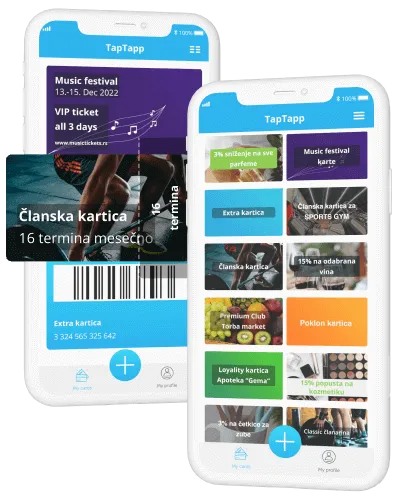
Center the image inside a white or pale-cyan card. Avoid filters, heavy crops, and generic stock photography.
Use Lucide for interface icons. Keep decorative brand illustrations as image assets.
Shared chrome
The live navigation and footer on this page are the source examples. Reuse them directly instead of rebuilding their links, language behavior, menus, or mobile interactions.
Fixed deep-blue header, white logo, compact uppercase links, desktop dropdowns, and a dedicated mobile menu.
Navbar
Deep-blue closing surface, grouped localized links, compact type, app identity, and generous vertical spacing.
Footer
Direct-answer pattern
A direct-answer section starts with a plain-language definition, follows with left-aligned white answer cards, and ends with contextual links styled as primary actions. It uses the standard 58.75rem content width and semantic headings so people and answer engines can scan it reliably.
State the useful answer before supporting detail, qualifiers, or navigation.
Use short headings and complete sentences. Keep the copy left aligned for fast scanning.
Link to the next relevant TapTapp page with the shared primary button treatment.
Behavior
Build mobile first with CSS breakpoints. Preserve hierarchy and touch targets, stack content before shrinking it, and keep product imagery readable at every size.
Use md: and lg: responsive variants. Do not use JavaScript viewport checks for layout.
Reusable content
One shared FAQ structure supports white and light-gray section surfaces. This specimen shows the approved spacing, typography, card treatment, and interaction states.
Za korisnike
Dodajte karticu, otvorite je kada vam treba i proverite kako TapTapp postupa sa podacima.
Otvorite dodavanje kartice u TapTapp aplikaciji i skenirajte QR kod ili barkod sa fizičke kartice. Sačuvana digitalna kartica prikazuje kod koji možete da pokažete na prodajnom mestu.
Pogledajte kako kartice radeUnesite broj kartice u aplikaciju. TapTapp će pripremiti kod koji možete da koristite na prodajnom mestu.
Pratite dostupne opcije oporavka u aplikaciji i proverite da li su podaci za oporavak ažurni.
Poruke i obaveštenja partnera prikazuju se u TapTapp aplikaciji kada ih partner omogući.
Detalji o obradi podataka opisani su u TapTapp politici privatnosti.
Guardrails
These rules protect the recognizable TapTapp visual language when new pages and components are added.
