Prepare the ticket
Create a branded digital ticket with your event's text and branding, and choose whether it carries a QR code or a barcode.

You sell and take payment for tickets through your own channel, and TapTapp issues them as branded digital tickets with a QR code or barcode. Staff scan them in the TapTapp app at the door, even offline. The price is 7% of the ticket price.
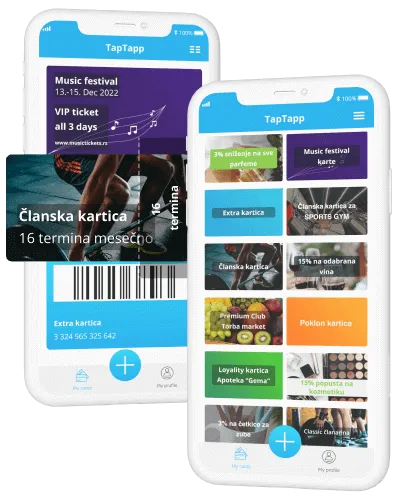
Quick answer
Sell the ticket on your website, at the box office or through partners. The buyer gets it in the TapTapp app, and your staff scan its QR code or barcode at the door with a phone, with no special scanner.
Create a branded digital ticket with your event's text and branding, and choose whether it carries a QR code or a barcode.
Sales and payment stay in your own channel. You issue tickets to buyers through your business account or an API connection with your sales system.
The ticket arrives in the free TapTapp app and opens without an internet connection. Guests can also show the QR code or barcode without the app.
The validator scans the code in the TapTapp app, even offline. When the phone is online, the app warns about a ticket that has already been used.
A digital ticket is a ticket on the guest's phone, with a QR code or barcode that is scanned at the door. It replaces the printed ticket: nothing to print, and guests don't leave it at home because it is on the phone they carry.
Before you start selling, answer three questions:
Your venue's capacity sets how many tickets you sell. If you have several prices, such as early-bird and regular, decide them before sales start.
On your website, at the box office or through partners. This decides how you issue tickets and whether you need a connection to your sales system.
Decide how many staff scan tickets and at which entrances, so the queue keeps moving when most guests arrive.
Any event where entry is checked. TapTapp tickets are designed for concerts, matches and festivals, and the same process works for other events.
One or several ticket prices. Most guests arrive just before the start, so plan enough validators.
Example: a club sells concert tickets at an early-bird and a regular price.
Tickets for a single match, scanned at several entrances at the same time.
Example: a sports club sells tickets for a home match.
Day and multi-day tickets. State clearly whether the ticket allows re-entry on the same day.
Example: a festival sells a one-day ticket and a ticket for all three days.
A ticket for the full programme or for a single workshop, often with the attendee's name.
Example: a conference organiser sells a two-day pass and separate workshop tickets.
First decide what you sell and where. Then prepare the ticket and how it reaches the buyer.
Name, date, time, venue and capacity. The same details go on the ticket and on the page where you sell it.
Regular, early-bird, VIP or day ticket. Next to each price, say what the ticket includes.
On your website, at the box office or through partners. You collect the payment, so check invoicing and fiscalisation with your accountant.
In TapTapp, prepare a branded ticket and choose a QR code or barcode. You can change the text and branding later, without reprinting.
The ticket arrives in the buyer's TapTapp app, through your business account or an API connection with your sales system. You agree the connection with the TapTapp team.
Send extra information before the event through the app, or a notice if the event is cancelled.
All you need is a phone with the TapTapp app, with no special scanner. Scanning works without an internet connection.
Validator is a feature inside the TapTapp app. Add the staff who scan tickets through your business account, so only people you give access can check tickets.
Charge the phones you scan with. Provide internet at the door if you can: scanning works without it, but the warning about an already-used ticket arrives once the phone connects.
Have each validator scan one ticket before the doors open, so they know what a valid ticket looks like on screen.
The guest opens the ticket in the TapTapp app, even offline, or shows its QR code or barcode without the app.
The validator scans the QR code or barcode in the TapTapp app and lets the guest in. When the phone is online, the app warns if the ticket has already been used.
Send guests with a flat phone or a ticket that doesn't pass to a separate point, so the main queue keeps moving.
Guests see the ticket when they buy it and when they arrive. Here is how the two differ in practice.
| Criterion | Printed ticket | Digital ticket in the TapTapp app |
|---|---|---|
| Printing | Tickets printed for every event. | No ticket printing. |
| Guest forgets the ticket | The ticket stays at home or gets lost. | The ticket is on the phone the guest carries. |
| Checking at the door | Staff look at the ticket and tear it. | The validator scans the QR code or barcode in the TapTapp app. |
| Same ticket used twice | A copied ticket is hard to spot at the door. | The app warns about an already-used ticket when the phone is online. |
| Changing text or design | Every change means a new print run. | Change the ticket's text and branding without reprinting. |
| Updates for guests | The ticket has no messaging channel. | Messages through the app, for example if the event is cancelled. |
| Records | Counting sold and used tickets by hand. | Sales and attendance reports. |
| Price | Cost of printing and distributing tickets. | 7% of the ticket price, invoiced by TapTapp to the organiser. |

TapTapp is an app for digital loyalty cards, memberships and tickets. You run sales and payment, and for your event you get:
FAQ
Answers for organisers who want to issue digital tickets and scan them with a phone.
No. You sell and take payment for tickets through your website, box office or partners. TapTapp issues the digital ticket to the buyer and handles scanning at the door.
The price is 7% of the ticket price. Buyers pay you, and TapTapp invoices you for the 7%. The TapTapp app is free for guests.
See pricingEither. You choose whether your ticket carries a QR code or a barcode.
The guest shows the ticket's QR code or barcode. The validator scans it in the TapTapp app, because validator is a feature of the app itself. You assign validators through your business account, and no special scanner is needed.
No. Guests can show the ticket's QR code or barcode without the app. In the free TapTapp app for iPhone, Android and Huawei, the ticket is always to hand and opens without an internet connection.
See how cards workYes. Tickets open and scan without an internet connection. The validator gets the warning about an already-used ticket once the phone connects to the internet.
When the validator's phone is online, the app warns that the ticket has already been used. Offline, scanning still works and the warning arrives as soon as the phone connects, so internet at the door is good protection.
Yes. Guests can transfer a ticket to another person.
No. TapTapp tickets don't carry a section or seat, and TapTapp doesn't issue refunds. Payment stays in your own sales channel.
Yes, tickets can be issued through an API connection where needed. You agree the scope of the connection with the TapTapp team.
Send an enquiryYes. TapTapp provides sales and attendance reports for your event.
Yes. You send messages to guests through the app, such as a cancellation notice or extra information before the event.
No. The generator creates a QR image for the link or text you enter and does not issue a valid ticket. For tickets that are scanned at the door, use TapTapp's business solution.
QR generatorYou can change the text and branding on a TapTapp ticket. If you want an app under your own name, the TapTapp team builds custom apps for tickets, loyalty programmes and memberships.
Custom app developmentSend a short description of your event: the date, capacity and where you sell tickets. The TapTapp team confirms the setup, scanning at the door and terms for your event.
