What is the card worth?
A set amount, a specific product or service, or a package of sessions. The recipient should see straight away what they have been given.

A gift card (or gift voucher) is an amount, product or service that a customer pays for in advance and gives to someone else. With the TapTapp app you issue a branded digital gift card, the recipient keeps it on their phone, and your staff check it at the till.
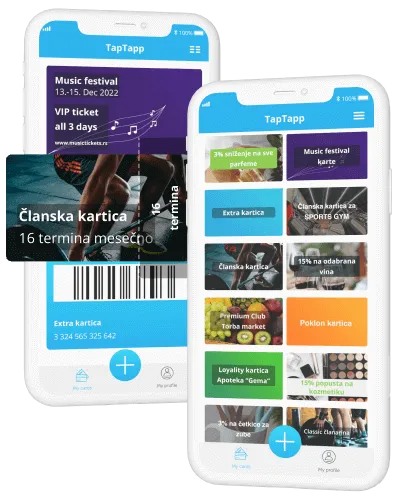
A gift card is a card or voucher that a customer pays for in advance and gives to someone. The recipient uses it in your shop for the amount, product or service shown on the card. For you, it is an advance sale and a visit from someone who may not have been your customer yet.
Before you start, answer three questions:
A set amount, a specific product or service, or a package of sessions. The recipient should see straight away what they have been given.
Choose an expiry period that gives the recipient enough time to use the gift, and show it clearly on the card.
Set the rules of use and decide who checks the card at the till, so every member of staff handles it the same way.
Choose a type a customer understands at a glance. One or two types are enough for many shops.
The customer pays a set amount and the recipient spends it on products or services of their choice.
Example: a boutique sells gift cards for RSD 2,000, 5,000 and 10,000.
The card is valid for one specific product or service, with no amount to track.
Example: a beauty salon sells a voucher for a manicure or a massage.
The card holds a number of sessions or visits that the recipient uses before the expiry date.
Example: a gym sells a gift package of eight training sessions.
A voucher the business gives away for free, for holidays, a customer's birthday or as a campaign reward.
Example: a café gives regular customers a free coffee voucher on their birthday.
Decide what you are selling first, then how the card looks and how it is checked.
An amount, a product or service, a package of sessions or a promotional voucher. Start with what customers already give as gifts most often.
Offer two or three amounts or services that people buy most often. Show the expiry date clearly on the card itself.
Whether the card is used in one go, whether it can be exchanged for cash and what happens after it expires. Check the tax and accounting side with your accountant.
A gift card should look like a gift: your logo, colours and a clear name. You can prepare a special design for the holidays.
Decide where the card is bought, who issues it and who checks it at the till. Staff should know how a redemption is recorded.
Promote them at the till, on your website and on social media, especially before the holidays. After the season, compare the number of cards issued and redeemed.
The recipient only sees the card when they come to use it. Here is how they differ in day-to-day use.
| Criterion | Paper or plastic voucher | Digital gift card in the TapTapp app |
|---|---|---|
| Costs | Printing vouchers and plastic cards. | No printing or reordering of cards. |
| Recipient forgets the card | The voucher stays at home or gets lost. | The card is on the phone the recipient carries. |
| Checking at the till | Staff look at the voucher and cancel it by hand. | Authorised staff validate the card with a mobile phone. |
| Records | Tracking issued and redeemed vouchers by hand. | You see the card status and last use in one place. |
| Holiday designs | Every new design means a new print run. | Change the text, colours and branding at any time, with multiple designs. |
| Communication with customers | The voucher has no messaging channel. | Messages about offers and events in the app. |
| Reports | Counting issued and redeemed vouchers by hand. | Monthly or custom reports in PDF, Word or Excel format, by agreement. |

With the TapTapp app you issue branded gift cards to your customers. The card lives on the recipient's phone:
FAQ
Answers for businesses that want to sell digital gift cards.
The price depends on the card type and plan. You confirm the scope and price for gift cards with the TapTapp team. The TapTapp app is free for your customers and gift recipients.
See pricingYes. The recipient keeps the gift card in the free TapTapp app for iPhone, Android and Huawei phones and shows its code at the till.
See how cards workGive staff the validator role through your business account. Authorised staff then check the card with a mobile phone, and you see the card status and last use in one place.
Yes. You can have multiple cards with your own design, and change the text, colours and branding at any time without reprinting.
TapTapp for business supports gift, loyalty and membership cards, with multiple designs for different programs. Confirm which cards you need with the TapTapp team.
Send an enquiryYour business name, the value or service, the expiry date and short rules of use. The recipient should understand the gift without further explanation.
Send a short description of your business and the gift cards you want. The TapTapp team then confirms the scope, validation, reports and communication for your case.
